
Automate the Repetitive Work — Keep People in Control
Searchooli designs AI secretaries, virtual assistants, phone-answering systems, and connected workflows that help answer calls, capture leads, schedule appointments, prepare follow-up, organize daily work, and keep your team informed — with people in control of what matters.
Real front-office help — governed by your rules, permissions, and approval. No guaranteed autonomy, savings, or perfect call handling.
A Chatbot Answers. A Searchooli AI System Gets the Work Done.
A chatbot replies in one corner and leaves the next step to you. A connected AI system understands the request, uses your approved business information, and carries the work forward — with a person in control of what matters.
A chatbot gives an answer. A connected AI system moves the work forward — built from four practical pieces: an AI secretary, an AI phone receptionist, an AI virtual assistant, and the connected automation that ties them together.
Four Practical Pieces, Working Together
Not a single gadget — a coordinated front office. What each one does depends on the systems connected, your rules, and human oversight.
AI Phone Receptionist
Answers, captures the opportunity, schedules when appropriate — and knows when to bring in a person.
AI Secretary
Starts the day by showing your team what needs attention.
Prepares daily priorities, summarizes new leads, calls, and messages, organizes tasks, and readies reminders and follow-up.
AI Virtual Assistant
Handles approved research, preparation, and routine admin work.
Drafts responses, organizes information, coordinates callbacks, updates connected systems within its permissions, and escalates anything sensitive.
Connected Automation
Moves work between the phone, calendar, CRM, inbox, tasks, and reporting.
Routes work to the right person, prepares and triggers approved follow-up, and records activity so nothing disappears between systems.
After Hours, a Homeowner Calls for an Estimate
Nobody’s in the office. Instead of going to voicemail — or a competitor — the AI receptionist picks up and turns the call into a booked opportunity.
An example workflow. The exact steps and actions depend on your phone setup, integrations, availability, and service agreement.
- 1Answers the call when configured to
- 2Identifies the service being requested
- 3Captures the caller’s name and number
- 4Confirms it’s inside your service area
- 5Answers approved, routine questions
- 6Checks your authorized availability
- 7Schedules or requests an estimate
- 8Creates the lead in your system
- 9Sends your team a concise summary
- 10Escalates anything unusual to a person
The Work Isn’t Hard. It’s Scattered.
Opportunities arrive from everywhere at once — and quietly scatter into dead ends before anyone can act on them.
A connected system doesn’t work harder — it stops the scatter.
One Operating Lane — From First Contact to Done
Every workflow runs the same way. Watch a single piece of work move through it: captured, understood, routed, approved, acted on, and tracked.
- 1CaptureWork enters one place — a call, a form, a message, a task.
- 2UnderstandAI extracts and summarizes the important details.
- 3DecideRules determine routing, owner, and next steps.
- 4ApproveA person reviews the actions that matter.Human-controlled
- 5ActThe approved action is carried out and handed off.
- 6TrackThe outcome and history are recorded.
Where AI Automation Helps Across Your Business
From sales and lead follow-up to customer communication, marketing and content, and day-to-day operations — practical, everyday automation. Not every capability is included in every engagement; scope depends on your systems, access, integrations, and service agreement.
Every lead answered, organized, and moved forward
Customer Communication
Marketing & Content
Operations
AI Does Real Work. You Decide Where Control Matters.
The AI can prepare, answer, and coordinate — but the moments that matter still come to a person. Approval isn’t a limitation. It’s the point.
Draft text confirming Wed 9:00 AM estimate, with your address and arrival window.
You stay in the driver’s seat — without doing the busywork.
- Approve — send it as prepared.
- Revise — adjust the wording first.
- Hold — park it until you’re ready.
- Send to a person — hand it to the right teammate.
This describes how we design workflows — it isn’t a legal or security guarantee. The exact controls depend on your systems and service agreement.
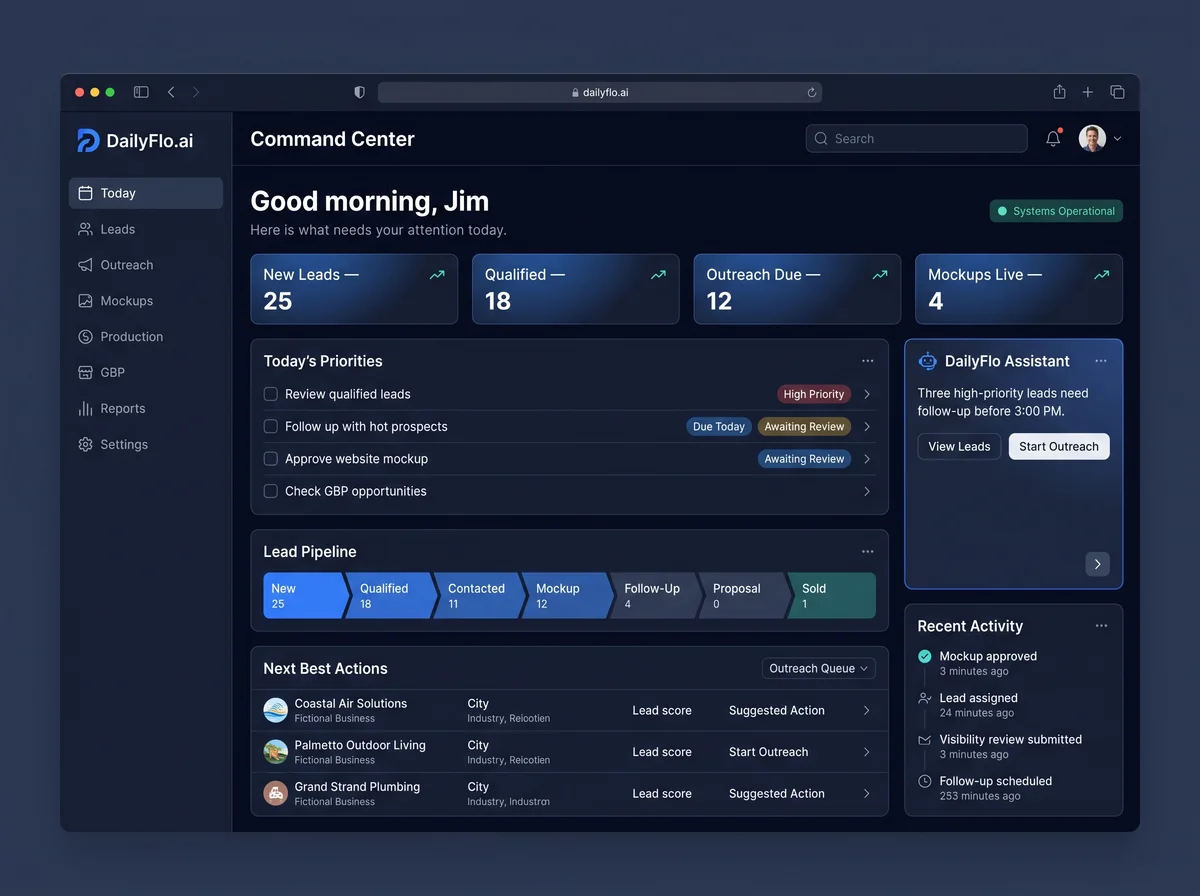
This Isn’t a Concept — It’s How We Operate
Searchooli runs its own front office and production through DailyFlo.ai — leads captured and routed, priorities surfaced, work assisted, and approvals kept in view. The same discipline shapes what we build for you.
A Careful, Repeatable Process
- 01
Identify the workflow
Find the repetitive work worth automating first.
- 02
Map people & systems
Who does what, which tools are involved, and where decisions live.
- 03
Define rules & approval gates
What may run automatically, and what waits for approval.
- 04
Build & connect
Configure the workflow and integrate within scope and permissions.
- 05
Test realistic scenarios
Run real-world cases before anything touches real customers.
- 06
Document & train
Your team gets clear operating guidance — approvals, exceptions, and normal use — before launch.
- 07
Launch carefully
Go live in a controlled way, with a person watching.
- 08
Monitor & improve
Refine the rules and workflow as the business changes.
An Automation Should Never Have More Access Than It Needs
- Authorized access only
Automations act through proper, authorized credentials — nothing touches a system it isn’t connected to.
- Least privilege
Each workflow gets only the access it genuinely needs, and no more.
- Protected credentials
Secrets and keys are stored and configured with care, not scattered in plain text.
- Stronger controls on sensitive actions
Higher-impact operations sit behind stricter rules and human approval.
- Logs & review
Activity is recorded so it can be reviewed — accountability, not a black box.
Plain-English principles, not certification claims. We don’t assert compliance we haven’t formally documented.
A Managed AI Front Office
Workflow Discovery & Opportunity Map
A clear map of your people, systems, calls, and repetitive work — and where an AI front office would genuinely help first. The starting point for everything else.
Configured Systems & Integrations
Your AI secretary, phone answering, assistant, and connected workflows — built and connected within your systems, access, and scope.
Process & Approval Design
How each workflow runs, where the rules sit, and exactly what waits for a person.
Testing & Operator Guidance
Realistic testing plus documentation your team can actually follow.
Ongoing Monitoring & Tuning
Watched, measured, and refined as your business changes — as defined in your agreement.
Launch support, monitoring, and refinement are included as defined in your service agreement.
Frequently Asked Questions
What is AI automation for a small business?
It’s using practical AI systems — an AI secretary, an AI phone receptionist, an AI virtual assistant, and connected workflows — to take repetitive front-office and operational work off your team. They can answer calls, capture and organize leads, prepare follow-up, coordinate scheduling, and keep everyone informed, while people stay in control of the decisions that matter.
What can an AI phone receptionist actually do?
When it’s set up and connected, it can answer inbound calls, speak naturally with the caller, identify why they’re calling, answer approved routine questions, capture contact and job details, qualify the inquiry using your questions, check authorized calendar availability, schedule or request an appointment, take a message, transfer or route to a person, and send your team a call summary. What it can do depends on your phone setup, integrations, and rules.
Is this just a chatbot?
No. A chatbot answers a question in one corner and leaves the work with you. A connected Searchooli AI system understands the request, uses your approved business information, captures the opportunity, checks rules and availability, prepares or completes the next approved step, records what happened, and brings in a person when needed.
Will AI replace my employees?
No — and we won’t pretend otherwise. The goal is to remove repetitive work so your people spend time where their judgment matters. AI prepares, answers, and coordinates; people still decide and approve.
Can the AI book appointments or send messages on its own?
Only within the boundaries you set. Low-risk actions can be allowed to run automatically; high-impact actions — anything that reaches a customer or changes a record — can be held for human approval. Scheduling uses your authorized calendar availability, and accuracy depends on that setup.
Does the AI answer calls 24/7?
It can answer whenever it’s configured to, including after hours — but availability depends on your phone setup and the service scope. We’ll be clear about what’s in place rather than promising round-the-clock perfection.
What about call recording, AI disclosure, and consent?
Requirements for recording calls and disclosing that an automated system is being used vary by location and situation. We design phone workflows to respect applicable consent and disclosure requirements, and we’ll flag where your input or legal guidance is needed. We don’t treat compliance as automatic.
What systems can be connected?
It depends on the tools you use and what they allow. Automations act only through authorized integrations, credentials, and permissions — phone, forms, email, calendars, CRM, tasks, and reporting are common. We map what’s possible with your systems before building anything.
Is my business information safe?
Data safety depends on proper setup, not on AI automatically. We work with authorized access, limit permissions to what’s needed, protect credentials, and keep activity logged for review. We don’t claim certifications we haven’t formally documented.
What happens when the AI is uncertain?
It escalates to a person instead of guessing. Uncertainty is treated as a signal to involve a human, not a reason to act automatically.
How long does an automation take to build?
A focused first system — say, phone answering with lead capture — is usually quicker than a full multi-system build. Timing depends on the steps, the tools involved, and how much testing a careful launch needs. We give you a realistic estimate after mapping it.
What is included in the Free Visibility Review?
A human-reviewed look at your website, search visibility, and Google Business Profile — with the most important gaps and opportunities in plain language, no obligation. It’s also a natural first conversation about where AI could help your front office.
See Exactly Where You Stand — Free
Get a clear, human-reviewed look at your website, search visibility, and Google Business Profile — no obligation.
Human-reviewed. Clear recommendations. No obligation.